
Guide
How to photograph a room for AI redesign
By RivAI Team at PixelPort LLC · Published · How we write guides
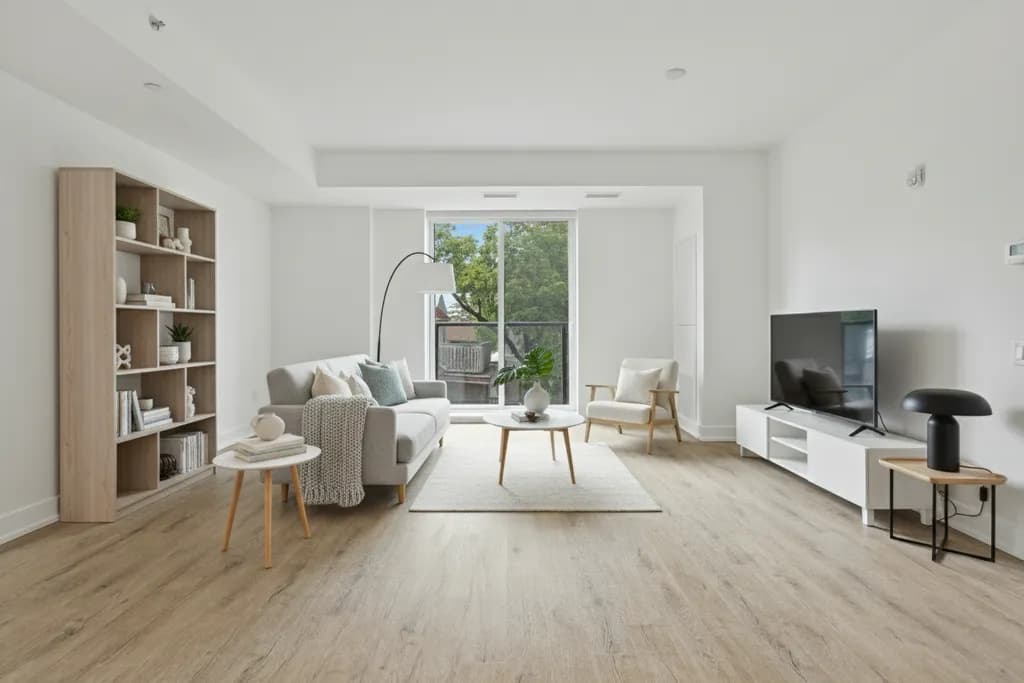
The short answerPhotograph your room in soft daylight with the lights on, phone held horizontally at chest height from a corner, lens clean, and the original full-resolution file. Keep the camera steady and vertical lines straight. Declutter first, or shoot as-is and remove objects in RivAI afterward. The same habits produce better real estate listing photos.
Why does photo quality decide redesign quality?
An AI redesign is only as good as the photo it starts from. The render keeps your room's geometry, light direction and proportions, so a dark, tilted or blurry photo produces a redesign that inherits all three problems. The good news: you do not need a camera, a tripod or any skill beyond a five-minute routine. The same routine also happens to be the core of good real estate listing photography, so learning it once pays twice.
How do you light the shot?
Daylight is the best light source you have, and it is free. Shoot mid-morning or mid-afternoon, when light is bright but not blasting through the windows as blown-out white rectangles. Open every curtain and blind fully, then turn on the room's lamps and ceiling lights as well. Mixed daylight and warm artificial light reads naturally to both AI models and human viewers, and it fills the shadow corners where detail dies.
- Avoid shooting toward a bright window; stand with windows beside or behind you so the room, not the sky, sets the exposure.
- Skip the flash: it flattens textures and creates a hard shadow halo that AI tools misread as objects.
- On gloomy days or at night, turn on every light source in the room and accept a slightly warmer, dimmer shot rather than a flash-lit one.
- If one side of the room is much darker, take a second photo angled toward it instead of trying to capture both extremes in one frame.
How should you frame the room?
Hold the phone horizontally. Landscape orientation matches how rooms are shaped, wide and low, and it captures two walls plus the floor and ceiling, which is exactly the spatial information an AI redesign needs. Portrait shots crop the floor or the ceiling and leave the model guessing about proportions. Any modern phone shoots more than enough resolution by default, so simply avoid sending compressed screenshots or chat-app copies of the photo.
- Shoot from a corner or doorway: you capture the most floor, two walls and the longest sightline through the room.
- Hold the phone at chest height, roughly 120 to 140 cm from the floor, not at eye level and never angled up or down.
- Keep vertical lines vertical: door frames and window edges should run parallel to the edges of your frame. Tilting the phone warps the room's geometry.
- Include the key elements you want redesigned: the main wall, the windows, the floor and the furniture you plan to keep.
- Take one wide shot of the whole room plus one or two angled shots of problem areas; different angles unlock different redesign options.
How do you keep the shot sharp and level?
Camera shake is the silent killer of indoor photos, because rooms are darker than outdoors and phones compensate with slower shutter speeds. Brace your elbows against your ribs or lean against the door frame, tap the screen to focus on the middle of the room, and take three shots of each angle so you can pick the sharpest. Wipe the lens first; a pocket-smudged lens produces a soft haze that no AI can distinguish from fog. If your phone shows a grid option in camera settings, turn it on and use the horizontal line to level the frame against the floor line.
Should you declutter before shooting, or fix it after?
Both approaches work, and the right choice depends on the mess. A five-minute physical tidy, clearing counters, floor piles and charging cables, is always worth it, because clutter hides the floor and walls that the AI needs to see. But do not deep-clean or stage for an hour: anything you cannot remove by hand, or simply do not want to, can be erased digitally afterward. RivAI's Remove Objects tool lets you brush over an item in the photo, a laundry basket, a pet crate, an old armchair, and erase it before or after the redesign.
- Declutter first when: items cover the floor or block walls, since the AI cannot redesign surfaces it cannot see.
- Remove objects after when: a few large items spoil the shot but you want the rest of the room exactly as-is.
- Empty the room digitally: the Empty Space tool removes all the furniture so you can see the room bare or start a from-scratch redesign.
- For listing photos, physically clear personal items first. If you edit a listing photo digitally, follow your MLS rules and label altered photos.
What are the most common mistakes, and how do you fix them?
- Dark, muddy image: reshoot in daylight with all lights on rather than brightening later, because editing cannot recover shadow detail the sensor never captured.
- Tilted walls: lower the phone to chest height and level it with the camera grid instead of angling up to fit the ceiling.
- Fisheye look: step back and use the phone's main lens rather than the ultra-wide, which bends straight walls at the edges.
- Cluttered frame: clear the floor and counters before shooting, or erase leftover items digitally with the Remove Objects tool.
- Tiny subject: fill the frame with the room itself, not a distant view of it from the hallway; the AI needs surfaces, not corridors.
- Over-edited photo: skip heavy filters and HDR presets, because unnatural colors carry straight into the redesign.
Does the same routine work for exteriors and gardens?
Almost exactly. Shoot the house or garden from far enough back to include the full facade or fence line, keep the phone horizontal and level, and favor morning or late-afternoon light when shadows are soft and the sun is not behind the building. Overcast days are secretly ideal for exteriors: the flat light shows true material colors without harsh shadow bands. For gardens, include a fixed reference like the house wall or a fence corner so the AI can anchor paths and beds to something real.
The five-minute shooting routine
- Pick a bright time of day, open all curtains and blinds, and switch on every lamp and ceiling light in the room.
- Do a five-minute tidy: clear floors, counters and cables, and wipe your phone lens.
- Stand in a corner or doorway, hold the phone horizontally at chest height, and turn on the camera grid.
- Level the shot so door and window frames run vertically, tap to focus, brace your arms, and take three shots per angle.
- Check the photos at full zoom: sharp, bright, full resolution, with floor, walls and windows all visible.
- Upload the best shot to RivAI, remove any leftover clutter digitally, and start redesigning.
Why do the same habits improve listing photos?
Real estate photography follows the same rules because buyers and AI models read photos the same way: wide horizontal frames, honest light and straight verticals. Wide, bright, level shots simply show a room better than dim, tilted portrait shots of the same space. Declutter physically before you shoot; if you do edit a listing photo digitally, check your MLS rules and label any virtually altered image so buyers know what they are looking at. Photograph every room from its two best corners, keep the same chest-height framing throughout, and the set of photos will read as one coherent, trustworthy listing rather than a random camera roll.
Put this guide to work: AI interior design, remove objects from room photos and remove objects from photos on iPhone.
Related
FAQ
What resolution does my photo need for AI redesign?
Any modern phone camera shoots enough resolution by default. What matters is avoiding compressed copies: use the original photo, not a screenshot or a version squeezed through a messaging app, and keep it sharp and well lit.
Should I hold my phone horizontally or vertically?
Horizontally. Landscape framing captures two walls, the floor and the ceiling in one shot, giving the AI the room's true proportions. Portrait shots crop critical surfaces and work only for narrow details, not whole-room redesigns.
Is it better to declutter before the photo or remove objects digitally?
Do a quick physical tidy first so floors and walls are visible, then remove anything remaining digitally. RivAI's Remove Objects tool erases stray items, and Empty Space removes all the furniture if you want to see the room bare.
What is the best time of day to photograph a room?
Mid-morning or mid-afternoon, when daylight is bright but indirect. Open all curtains, turn on every light, and keep windows beside or behind you. Avoid night shooting with flash, which flattens textures the AI needs.
Can I use these tips for real estate listing photos too?
Yes, the routine is identical: daylight, horizontal framing at chest height, straight verticals and a decluttered frame. If you add any digitally altered or AI-furnished images to a listing, follow your MLS rules and label them as virtually altered.
Last updated 2026-10-09



Try it on your own room
Snap it, pick a style, see it redesigned in about 30 seconds.
Free to try · 3-day free trial on annual · Cancel anytime
